
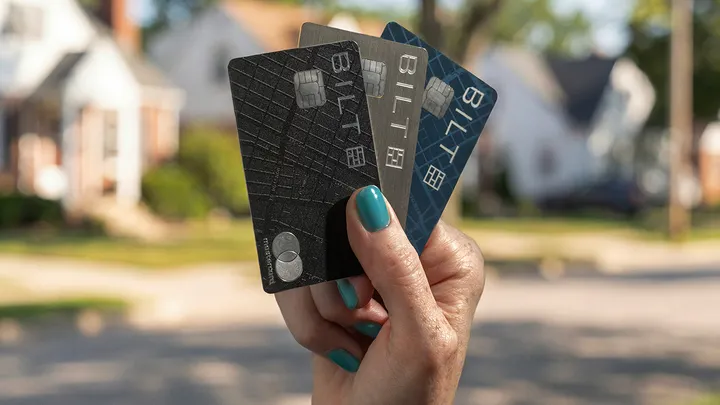
My Bilt rent payment failed twice before I figured out what was wrong. After chatting with Bilt support, the fix turned out to be embarrassingly simple: I needed to update my default bank account in the Wallet section of the Bilt app. That was it. Two failed payments, one eviction notice from my landlord, and the whole thing came down to a settings screen I didn’t know existed.
If you’re dealing with the same issue, or if you’re setting up Bilt rent payment for the first time after the 2.0 relaunch, this guide will save you the headache I went through. After being told repeatedly that “nothing changes with how you pay rent” during the Bilt 2.0 launch, I simply believed it and continued to pay rent as normal. You can learn from my mistake.
Here’s everything you need to know about how Bilt rent payment works in 2026, how to set it up, how to fix it when it breaks, and how the new mortgage payment option works.
How Bilt Rent Payment Works Now (It Changed in 2026)
This is the most important thing to understand: Bilt rent payment works completely differently than it used to. Under the old system (Bilt 1.0 with Wells Fargo), your rent was charged to your credit card. You had until your statement due date to pay it off, which meant you could float the payment for a few weeks. A lot of people liked that flexibility. That’s gone. With Bilt 2.0, rent payments are pulled directly from your linked bank account via ACH. It doesn’t touch your credit line at all. Think of it more like a direct debit than a credit card charge. You still earn Bilt points on the payment, but the money leaves your bank account when you submit the payment, not at the end of a billing cycle. This means your full rent amount needs to be available in your checking account on the day you make the payment. If it’s not there, the payment will fail.
How to Set Up Bilt Rent Payment
Whether you’re in a Bilt Alliance building or paying rent to an independent landlord, setup happens in the Bilt app.
If You Live in a Bilt Alliance Property
This is the simplest setup. Your building already works with Bilt, so there’s no extra routing or account numbers to deal with.
- Open the Bilt app
- Go to the My Home tab
- Confirm your payment method and rent amount
- Choose your payment day and whether you want autopay
- Tap Confirm autopay
Your rent will process automatically each month through your Bilt card, funded by your linked bank account.
If You Live Outside the Bilt Alliance
You’ll use Bilt’s BillPay for Home feature. This is where most people run into confusion, so follow these steps carefully.
- Open the Bilt app and go to the My Home tab
- Tap Get Started under BillPay for Home
- Select Rent as your payment type
- Choose how you want to pay: Property Portal, Check, or Venmo
- Follow the on-screen prompts to enter your landlord’s details
- Complete your first payment
If you choose the Property Portal option, Bilt will give you a unique routing and account number. You’ll need to add this as a payment method in your landlord’s rent portal, the same way you’d add a bank account for ACH. You only need to do this once. If you choose Check (Bilt cardholders only), Bilt will mail a physical check to your landlord. You can select USPS, FedEx 2-Day, or FedEx Overnight depending on how close you are to your due date. If you choose Venmo (Bilt cardholders only), Bilt sends the payment to your landlord’s Venmo. Your landlord will see it coming from “Bilt Technologies” with your name in the memo. Allow 3 business days for Venmo payments to arrive.
Bilt Rent Payment Not Working: How to Fix It
Since the Bilt 2.0 relaunch, payment failures have been one of the most common complaints. I experienced this firsthand, and after talking to Bilt support, here are the most common reasons payments fail and how to fix each one.
Your Default Bank Account Isn’t Set Correctly
This was my problem. When Bilt 2.0 launched, it required a linked checking account as your default payment method. If you have multiple bank accounts in your Bilt Wallet, the app might not be pointing to the right one. The fix: Open the Bilt app, go to Wallet, and check which bank account is set as your default. Make sure it’s the checking account that actually has your rent money in it. This one change fixed both of my failed payments.
Insufficient Funds at Time of Payment
Under the old system, rent hit your credit line and you had weeks to pay it off. Now it pulls directly from your bank account immediately. If your full rent amount isn’t available when the payment processes, it will be declined. Make sure your rent money is in your account before you submit or before your autopay date.
Your Bilt Card Is Locked or Turned Off
Even though rent is paid via ACH from your bank account, you still need an active Bilt card to initiate the payment. If your card is locked, frozen, or turned off in the app, your rent payment will be declined. Check your card status in the app and make sure it’s active.
Bilt Flagged Your Payment as Non-Housing
This has been one of the stranger Bilt 2.0 bugs. Some users have had their rent or mortgage payments flagged and rejected because Bilt’s system didn’t recognize them as housing-related. If this happens to you, contact Bilt support immediately through the app (tap your profile icon and use iMessage or WhatsApp). They have 24/7 live support and can usually resolve these flagging errors manually.
Venmo Payment Delays
If you’re paying via Venmo, remember it takes 3 business days for your landlord to receive the funds. If you submit on a Friday, they might not see it until Wednesday. Always submit Venmo payments at least 3 business days before your due date to avoid late fees.

How to Choose Your Bilt Rewards Option
With Bilt 2.0, you have two ways to earn rewards on rent. You can switch between them each month, so you’re not locked in.
Option 1: Flexible Bilt Cash You earn 4% back in Bilt Cash on everyday (non-housing) spending. Then you use that Bilt Cash to unlock up to 1x points on your rent payment. The more you spend on the card outside of rent, the more points you earn on rent. To max out at 1x points on rent, you need to spend about 75% of your rent amount on non-housing purchases.
Option 2: Housing-Only Rewards You earn up to 1.25x points per dollar on rent and mortgage payments, but you don’t earn Bilt Cash on everyday spending. This is simpler and can be better if your rent is high relative to your other spending. For most people, the Flexible Bilt Cash option ends up delivering more total value because you’re earning on both rent and everything else. But if you don’t plan to use the Bilt card for everyday purchases, Housing-Only is the straightforward choice.
How to Pay Your Mortgage with Bilt
Bilt 2.0 introduced mortgage payments, which was one of the most requested features. This is exclusively for Bilt cardholders (you need one of the three new cards: Blue, Obsidian, or Palladium). Here’s how to set it up:
- Open the Bilt app and go to the My Home tab
- Tap Get Started under BillPay for Home
- Select Mortgage
- Choose your payment method: Online portal, Check, or Direct payment (if your servicer is a Bilt partner)
- Enter your mortgage servicer details
- Submit your payment
A word of caution: mortgage payments through Bilt have had more issues than rent payments during the 2.0 rollout. Some users have reported payments being flagged as non-housing, delayed processing, and even payments that were debited from their bank but not received by their mortgage servicer for over two weeks. If you’re setting up mortgage payments through Bilt for the first time, consider making your first payment well ahead of your due date so you have a buffer if something goes wrong. Keep your previous payment method active as a backup until you’ve confirmed at least one payment has gone through successfully.
Do You Earn Points Paying Rent with Bilt?
Yes, with every Bilt card tier (Blue, Obsidian, and Palladium). There are no transaction fees when you pay through Bilt, which is the main advantage over using a regular credit card where your landlord would typically charge a 3% fee. How many points you earn depends on which rewards option you choose (Flexible Bilt Cash or Housing-Only) and how much you spend on the card outside of rent. At the maximum, you’re earning 1.25x points per dollar on rent with the Housing-Only option, or 1x points per dollar when you fully fund it with Bilt Cash. Those points transfer 1:1 to partners like Hyatt, Turkish Airlines, Air France, Virgin Atlantic, and more. We broke down the full value of Bilt points and the best ways to use them in our Bilt Rewards guide.
Is Bilt Rent Payment Worth It?
If you’re already paying rent or a mortgage, earning points on that payment for free is a no-brainer. Bilt is the only program that lets you do this without a transaction fee, and the points are genuinely valuable when transferred to airline and hotel partners. The Bilt 2.0 transition has been bumpy. Payment failures, confusing rewards tiers, and the shift from credit line to ACH have frustrated a lot of people. But the underlying value proposition hasn’t changed: you’re turning your biggest monthly expense into transferable travel points at no additional cost. My advice: set it up, double-check your default bank account in the Wallet section (learn from my mistakes), make your first payment manually to confirm it works, then turn on autopay once you’re confident. And always keep your previous payment method as a backup for the first couple of months. Create your free Bilt Rewards account here if you don’t have one yet. Even without a Bilt card, you can earn points on rent, dining, fitness, and Lyft rides through the free app. For the full breakdown, check out our Bilt Rewards guide.
Leave a Reply